Change Default OEM Logo in Windows 7
When Windows 7 operating system is installed on a computer the default OEM logo is displayed when you go to system properties. Many users want to modify this setting just for fun whereas others may want to change the default logo for various licensing reasons. Default OEM logo is located at C:WindowsSystem32oobeinfo which is a .bmp file of a specific size. In order to modify the OEM logo you need to place another picture of your choice and it should be of the same size. You need to place the picture at the above location and also you need to modify the default from the registry. You can do so by following the steps given below:
- Logon to the computer with administrator account and choose the appropriate bitmap image that you want to use as an OEM logo.
- Place the selected picture at C:WindowsSystem32oobeinfo location and open Windows Registry Editor by typing regedit in the search box available at the bottom of start menu.
- In the registry editor go to HKEY_LOCAL_MACHINESOFTWAREMicrosoftWindowsCurrentVersionOEMInformation and double click on Logo.
- In the opened box under Value data field leave the entire path intact except replacing the .BMP file name with the new one.
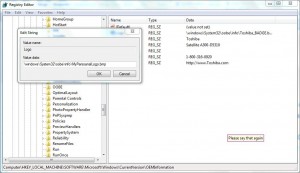
- Once done click on Ok button to accept your changes and close Windows Registry Editor window.
- Restart your computer to allow the changes to take effect.
