Check For Duplicate Files, Right Now!
As storage space available to most PC users grows so does the need to check for duplicate files especially when your 1 TB drive seems to be full and you only keep a few games and a lot of family photos on it. When I say "a lot of family photos" you have no idea what that really means at least in my case believe me! Sure this leads us to that point where we need the best tool to help us find duplicates and if it's a free one that's even better! ;)
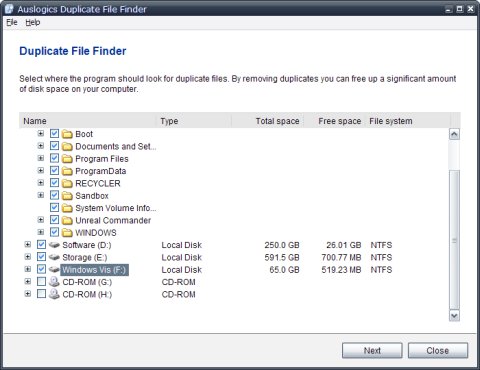
Obviously there isn't only one freeware program that can check for duplicate files but I have just one here today and its name is Duplicate File Finder. Coming from Auslogics an Australian software company this program is free and will remain this way also coming without any adware or limitation. Best part of it especially for those using some 64-bit Windows OS is Duplicate File Finder's support for them including Vista and Windows 7!
Once you download the 1.6 MB setup package and install the program everything works as natural as having a beer (or two-three-four-and-so-on... I hope you're not one of those against beer and if you are just think about anything else that's natural to you like breathing)! These being said let's go quickly through a duplicate files check session shall we?
First you have to select the drives/folders to check for duplicate files. I suggest that you select all your fixed drives because it only took a few minutes to scan almost 800 GB of data in my case.
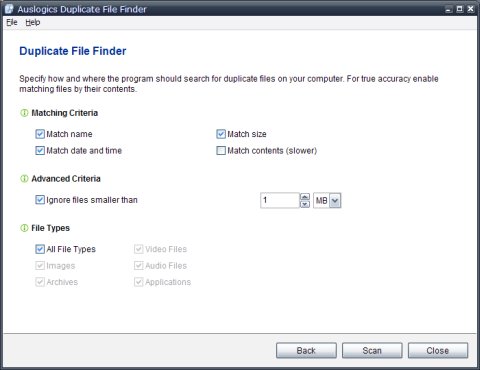
Next you should choose the program settings for the scan you'll soon fire up and my suggestion is to avoid selecting "Match contents(slower)" and the reason should be obvious.
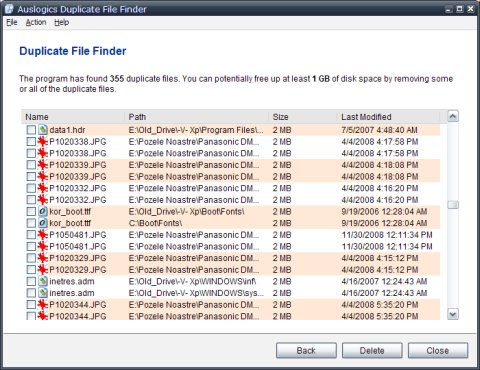
After pressing the Scan button and seeing the results you can select the duplicates you want to delete and press the Delete button. Ta-taaa! That's all!
I don't know what else there can be said about Duplicate File Finder since this program is extremely straightforward as you can see in the short walkthrough above. Since even my mother could easily use it and it comes free from any charge I think this piece of code will remain installed on my computer for a long time since now... and this is exactly what I suggest to those of you who have same duplicate files problem as I do.