Clean Your PC To The Bone!!!
Most of the people I know clean their houses on Saturday and while I see nothing wrong with that I'll do some cleaning right now on Monday! What kind of cleaning? Oh well since I messed with my vacuum cleaner this last Saturday I won't do it again - after all I'm not living in the middle of a desert but that doesn't mean my computer is clean. No no I am not talking about dust - that goes away easier than junk files trust me!
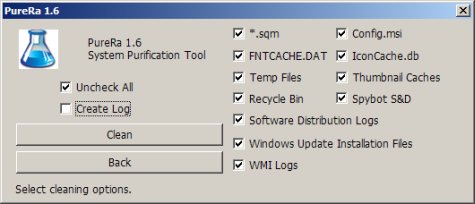
OK so we know it's about cleaning your PC so here's some of the official mumbo-jumbo: "PureRa removes files from your computer that other mainstream cleaning programs tend to overlook. Some of the targets can simply be removed to create some valuable space while others are removed in an attempt to repair certain problems because they will simply recreate themselves. Targets that are currently removed by PureRa are: Config.msi Thumbs.db Iconcache.db .sqm-files Desktop.ini etc."
Freely available and extremely light (less than 80 KB) PureRa gets the job done properly and pretty fast. Although I already use a few other system cleaning tools I managed to save some extra 80 MB of space right after running all the other programs I mentioned for a complete sweep. PureRa seems to work with most popular Windows versions including Vista and 7 and comes under the terms of the GPL license. There's nothing to install just download the package extract the EXE file and run it nothing more. That's all folks get to those junk files and kill'em all! ;)
Previous: Free Online Audio Editing From Aviary
Next: Google 3D Warehouse