Lightshot (screenshot tool)
When it comes to taking screenshots in a Web browser Firefox users can choose one of the many great plugins built for this specific purpose Maxthon users can use the capabilities that their browser comes with right out of the box while Opera users can easily press the PrintScreen key... but there's no need to worry - if you want to do this the right way Lightshot is exactly what you need to get the job done with style! ;)
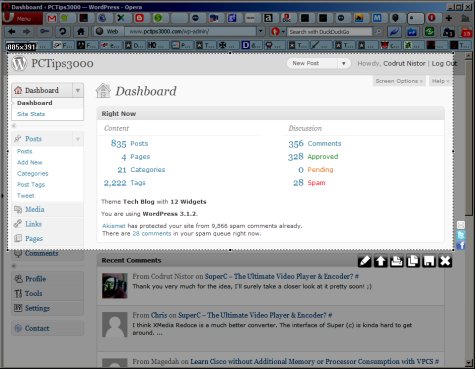
As I write this I'm messing with version 0.1 of Lightshot (screenshot tool) one Opera extension that allows you to quickly take a screenshot of any selected area including video/Flash content then do what you want with it - send it directly to Facebook or Twitter save it to your local hard drive (JPEG PNG and BMP file formats available) edit it online send it via email and so on. For now it's impossible to grab a shot of tall pages (in Maxthon for example you can grab pages that require a lot of vertical scrolling without breaking a sweat) and you'll also need to install a 1.7 MB plugin to get Lightshot ready to go.
Other than the above... I should also add that online editing is done using Pixlr's API so you won't have to bother with Microsoft's Paint or any other program. Sure most people have some free image editor but... why install additional software when you can get the job done online in just a few seconds with Lightshot?
Obviously Lightshot is free and the numbers should say more than I just did - with only 2974 downloads so far this 47.9 KB Opera extension has a rating of 4.5/5 stars already after no less than 46 user reviews. Sweet!
Oh yeah one more thing - if you happen to know a better tool for taking screenshots right inside Opera please go ahead and enlighten us all will you? It would be really awesome to finally be able to capture entire pages no matter how large the result may be... ;)
Previous: 1DCutX 1.0
Next: Khan Academy