Manage Your iDevice with i-FunBox

Ishayat August 15, 2011 6

i-FunBox is a free file manager for iPhone, iPod Touch and iPad that helps you to manage your iDevice in a simple and easy way. You will find the file manager similar to Windows File Explorer but it’s much more efficient and user friendly. Usually a user has to open iTunes for managing his iDevice but this free file manager for iPhone can be a great free alternative to iTunes.

This free file manager fully supports iOS 4.0 so you don’t have to worry if your iDevice is compatible or not. One of the best features of this free iDevice file manager is its one stop app installing service. You can install .ipa packages safely with its one-stop app install feature. You can install purchased apps with this free app manager for iPhone without even jailbreaking it. You can create a backup of installed apps or uninstall them in batch.
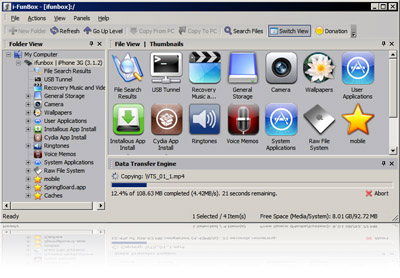
If you want to use your iDevice as a USB portable disk, you can do it with this alternative to iTunes. The latest version supports iOS 5 and iPad 2. You will be able to install apps 3x faster now. I am personally using it for my iPod Touch and I believe it’s a great alternative to iTunes for people who don’t want to use iTunes.

Features of i-FunBox:

  • Manage your iDevice in an easy and friendly way
  • Install .ipa packages with its One-stop app install feature
  • Create backup of your installed apps
  • Use your iDevice as an USB portable disk
  • Export movies and music on iDevice

i-FunBox is available for download at i-FunBox’s official website. It’s only 2.65MB in size and supports Windows 7, Vista and XP. Download i-FunBox Free

6 Comments »

  1. Csaba Kissi August 15, 2011 at 7:41 pm - Reply

    I was curious to try it. Unfortunately its available only for windows :( , Hope guys will wake up soon and port it to MAC OSX.

  2. Bhree December 15, 2011 at 4:58 am - Reply

    Hi, I no longer have the laptop that held my itunes, I need to transfer the music from my iPod (bought in 2004 I can’t see what model number it is) onto my new laptop. I was advised that iFunbox will do this – can you confirm?

  3. Ishayat December 29, 2011 at 7:27 pm - Reply

    Hi Bhree, If you want to transfer all your music from your iPod, using CopyTrans Manager will be a good idea. Chk this link to know more about CopyTrans Manager: http://www.pctips3000.com/copytrans-manager-free-itunes-alternative-for-windows/

  4. Tom January 26, 2012 at 5:02 am - Reply

    Need help transferring things from my laptop to my i-phone…

    I have some photos and videos that I took on my i-phone 3GS and want to put them onto my wife’s i-phone 3GS…downloaded the photos and videos from my i-phone to my laptop and recently installed i-FunBox to try and transfer them to my wife’s i-phone…supposedly you just have to drag and drop the photos/videos you want to move but for some reason when we try an “X” appears over her i-phone icon and it does not transfer…

    …side note we are using a Japanese laptop with Windows 7 and Japanese version of i-FunBox…

    Can anyone offer any assistance?

    Thanks…

  5. Carrie February 12, 2012 at 9:24 pm - Reply

    Hi Tom! I just saw your post… To transfer photos from my laptop to my iphone I just usually use itunes for that. When you connect iPhone on pc and itunes recognizes it, just click on the Photos tab on top and check the box “Sync Photos from”. Beside it, you will see a drop down menu and just click “Choose folder”, locate the folder of the pictures you want to transfer on the iphone and there you have it. When you click on sync, the photos will be copied on the iphone. But you can only use this method if its okay with you to sync iphone with itunes. Anyway, goodluck!

  6. roise May 7, 2012 at 10:29 am - Reply

    hi :) im trying to use i-funbox and ssh on my ipod but when i open i-funbox while my ipod is connected on my laptop. it always says “Apple Mobile Device Drivier is not installed. Please install iTunes(R) from Apple.com” but i’ve already installed iTunes…
    Any help? :)

Leave A Response »