Free Online Video Editing, Anyone?

Codrut Nistor August 27, 2010 8

One of these days, somebody may come up with a Web-based microwave oven, or even your backyard grill may become a Web-based thingie! No, I am not talking about online orders, I am thinking about uploading the raw meat and getting it back grilled with just a few clicks, and if this seems a crazy idea now, look at JayCut and think how crazy would have been the idea behind it in the early 1990s!
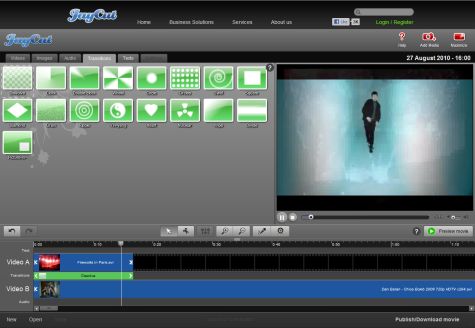

To cut a longer story short, let me say that JayCut allows you to remix and trim videos, as well as images, add captions, subtitles, music, transitions and various effects, not to mention outstanding features like its 1-click YouTube export capability or the ability to save your work ready to go on the iPhone, Windows or Mac (H.264, XVID).

After the latest update, JayCut got webcam and voice-over support, slow motion effects, and a bunch of other goodies. While uploading large files could take a while, I must say it all works great on my side (partially thanks to my ISP, I guess), and in case you were wondering about the benefits of a free account, here they are: 2GB of storage and export/save capability for up to 20 videos per month.

That’s all, folks, I leave the rest of it for you to discover – it’s a lot of fun, especially since you can start messing with this free online video editing tool right away by using the videos already available on the server. Now, you have no excuse left – get to it!!!

8 Comments »

  1. pppp August 27, 2011 at 12:26 am - Reply

    is it free to use ? do I need to pay monthly fees and how can i download it?
    please reply soon

    • Codrut Nistor August 27, 2011 at 12:13 pm - Reply

      Yes, it is free, no you don’t need to pay any fees, there’s no need to download it. Did you even read the article??? Please read it once again, then once again, then again and again and again until you understand it – all your questions have been answered in the article already! ;)

  2. Tony Nelson August 29, 2011 at 6:27 pm - Reply

    I’ve been using now for about 6 months. It’s great for short videos, but when your video gets longer, it gets to be a pain to preview. You have to hit a “preview movie” button and it must compile your clips, transitions and sound together.

    Unfortuneatly, at least for me at this time, it keeps giving me “SAVE” errors so I can’t edit and save, download or preview the movie. Tough thing when you have a deadline to meet by no way to get at your video…

  3. mishka September 4, 2011 at 7:51 pm - Reply

    I dont understand how to work this after reading the article several times. I have one question about JayCut.
    How do i make an account?
    I wouldnt mind having some step by step instructions to make it. Although the information on this article is very helpfull it’s still not enough for me to understand.

    • Codrut Nistor September 4, 2011 at 10:56 pm - Reply

      Open the JayCut page. Click on Log In. Click on Register… when it becomes available, it seems they’re not accepting new users at this time. :|
      P.S. Try emailing them or following them on Facebook, they’ll surely let the world know when new users can join! ;)

  4. picipc November 26, 2011 at 11:46 pm - Reply

    JayCut.com says: “If you haven’t already signed up, thank you for your interest, however we are not able to register new users at this time.” (26 November 2011)

  5. Manish Mahajan November 28, 2011 at 6:21 am - Reply

    What is the sense to download jaycut if they are not taking new users…its ridiculous!

  6. wedi afro January 8, 2012 at 3:00 pm - Reply

    what is this it can’t even download i trayed to instal.

Leave A Response »