PicPick, More Than Just Screen Capture
When I look for topics worthy of PCTips3000 I usually avoid programs that could and should get a nice review on Download3000 but today I will tell you about a piece of code that will surely get there as well. The reason? PicPick today's subject is a tool that you really have to get NOW no matter if you're going to read a long review or just take my word for granted together with a few sentences about the goodies available in the package...
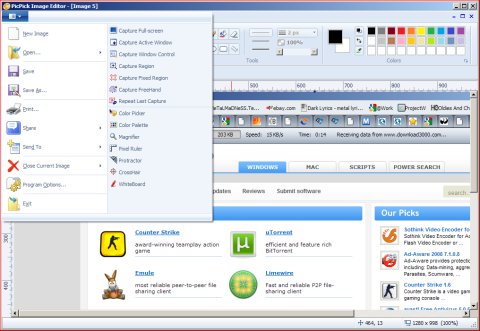
Before anything else a warning: be sure to avoid installing the Bing Bar! Sure if you really need it go ahead but I think we're here for PicPick and not some useless toolbar right? To install this program you only need less than 7MB of free disk space but I should also add that over 28 languages are supported and - hang on! - PicPick fully supports Windows 7!!!
But what is this program all about? Just think about these: screen capture image editor color picker/palette screen pixel ruler magnifier protractor crosshair and whiteboard - all in this piece of code all for free! If you want to know more just get it and give a try... or wait for the review if you can find the patience... ;)
Previous: Unleash Your Inner Artist!